As the core component of CStore Essentials, you're able to gain better control of your daily operations by knowing what is occurring in your store in real-time.
Reduce errors and minimize risk with accurate reporting and automated processes.
Whether you manage one store or multiple, CStore Essentials gives you the tools you need to easily manage and operate your store.
Eliminate manual processes, reduce errors, and see everything going on in your store from anywhere.
From one login, you can access your pricebook, inventory, daily reporting, and services. Even when you’re on the go, you can view live sales, manage your pricebook, receive purchases, and more, all from the CStore Essentials Mobile App.
We are constantly working to improve user experience to save you time on important tasks in your store. CStore Essentials automates processes that you’re currently doing manually – minimizing the risk for error and letting you spend more time on the things that matter most.
Pricebook utilizes what is currently in your system, copying into your account. You can add item costs at an individual level, show margins, and do item-level inventory from anywhere. Our mobile app allows you to scan items, adding to your pricebook – reducing manual errors.

Save time on lottery services by using your phone to scan lottery deliveries, games, and packs that automatically update in CStore Essentials. With our back office, you can access lottery reports like scratch-off reports, inventory, lottery and lotto, and balance reports.

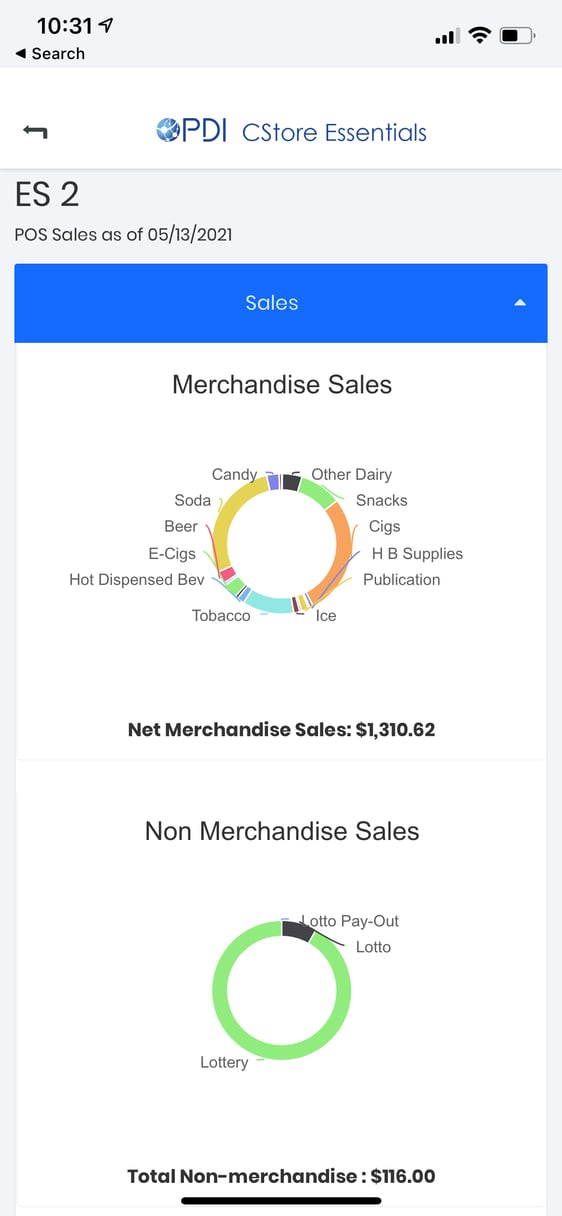
Look at your store's live POS sales in real-time with the mobile app from anywhere. Monitor all transactions going on in your store with your phone.
Stay on top of your inventory deliveries by scanning items with your phone. Easily see which invoices aren’t retailed and update new deliveries you receive.
Update inventory by scanning the barcode with your phone and input the quantity received. Updates automatically get sent to your register.
At the very least, you will need a computer. If you want the pricebook feature, you will need specific cables to connect your back office computer to your POS register. Click here for the Ethernet Cable and here for the USB to Ethernet converter.
We support several scanners and configurations, from camera-based to Bluetooth and laser scanning. Here are some recommendations to help you choose the right device for you:
Yes. We automatically back up your updated data every day and maintain two copies of your data at any time. Your data is stored on firewall-protected, redundant servers, protecting it from viruses, hackers, and hardware and software failures.
If the Internet connection at your location is down, you won't be able to access your PDI CStore Essentials account. However, your POS register will still be available, and you will be able to use it as usual.
At the very least, you will need a computer. If you want the pricebook feature, you will need specific cables to connect your back office computer to your POS register. Click here for the Ethernet Cable and here for the USB to Ethernet converter.
We support several scanners and configurations, from camera-based to Bluetooth and laser scanning. Here are some recommendations to help you choose the right device for you:
Yes. We automatically back up your updated data every day and maintain two copies of your data at any time. Your data is stored on firewall-protected, redundant servers, protecting it from viruses, hackers, and hardware and software failures.
If the Internet connection at your location is down, you won't be able to access your PDI CStore Essentials account. However, your POS register will still be available, and you will be able to use it as usual.